As a follow-up to my post about Desktoptwo, I just ran across a week-old post at WebWare reviewing three similar services: Zcubes, G.ho.st, and Sparc. I seem to remember looking at Zcubes a while back and finding it a bit sloppy, but perhaps I'll go back and have a look.
Virtual desktop trifecta at Web 2.0 Expo Webware : Cool Web apps for everyone
Monday, April 23, 2007


MiniBoxs Misses "E" and the Mark
Another competitor for the likes of OriginalSignal and PopURLs is MiniBoxs (what happened to the "e?") which is an RSS aggregator billing itself as the "Net's first RSS magazine." If that's what this is, then I don't think they're the first.
It's a nice-looking site and the editors do a good job of choosing feeds to include. I like the Buzz! page, which aggregates the most popular items from many social news sites like Digg, Reddit, Del.icio.us, Furl, TailRank, etc. This is similar to other sites of this type, but they have a pretty comprehensive list here.
It's a nice-looking site and the editors do a good job of choosing feeds to include. I like the Buzz! page, which aggregates the most popular items from many social news sites like Digg, Reddit, Del.icio.us, Furl, TailRank, etc. This is similar to other sites of this type, but they have a pretty comprehensive list here.
All in all, I prefer PopURLs and OriginalSignal, but my true preference will likely always be rolling my own.
MiniBoxs Buzz!
Saturday, April 21, 2007
Weather.com Maps Smooth Like Buttah
If you haven't already noticed, weather.com has a new weather map in beta and it's very slick. Imagine GoogleMaps, with all its click-and-drag/scrollwheel zoom goodness with weather overlayed.
You can choose clouds and/or RADAR images with transparency, add roads, and animate. The interface is smooth like butter. I still prefer Accuweather overall, but Weather.com scores points here.
Weather Radar and Weather Maps - weather.com
You can choose clouds and/or RADAR images with transparency, add roads, and animate. The interface is smooth like butter. I still prefer Accuweather overall, but Weather.com scores points here.
Weather Radar and Weather Maps - weather.com
Friday, April 20, 2007
Curse Your Enemies with Biblical Authority
Insults with pious panache, courtesy of Ship of Fools. My current favorite:
"Take heed, O ye of little faith, for you will be pursued into the mountains by sex-mad baboons!"
Ship of Fools: Biblical curse generator
"Take heed, O ye of little faith, for you will be pursued into the mountains by sex-mad baboons!"
Ship of Fools: Biblical curse generator
Top 10 Reasons as to why I still need to be convinced about marketing on Second Life
HP's Eric Kintz makes some great points about Second Life here, some of which I echoed a while back. I agree that the potential for marketing may still be there and, more importantly, a sustainable user environment may still be there, but I think SecondLife 3.0 needs a lot of work.
Top 10 Reasons as to why I still need to be convinced about marketing on Second Life
Top 10 Reasons as to why I still need to be convinced about marketing on Second Life
Microsoft entices beta testers with Windows Media Center update
Microsoft entices beta testers with Windows Media Center update
4/19/2007 7:30:00 pm

It was but three months ago that Microsoft opened the flood gates to beta signups for Windows Live for TV, and now the mega-corp is soliciting the help of free laborers yet again to test out a potentially buggy and likely frustrating piece of forthcoming software. If you're still intrigued, Microsoft is holding an open signup to beta test Windows Media Center update for Vista, but we certainly hope you weren't counting on even a partial list of features, as the curiously bland signup page doesn't relinquish much of anything beyond procedural instructions. So if you're hankering for something new to try out, and don't mind replying to Microsoft's "surveys, bug reports, and other means as required," feel free to hit the read link and toss your name in the hat.
[Via BoyGeniusReport]
![]()
![]()
![]()
Ugh, how bad will the new Windows Media Center be? I switched to BeyondTV after about a month of wrestling with Media Center and I haven't looked back.
4/19/2007 7:30:00 pm
Filed under: Desktops, HDTV, Home Entertainment, Media PCs
It was but three months ago that Microsoft opened the flood gates to beta signups for Windows Live for TV, and now the mega-corp is soliciting the help of free laborers yet again to test out a potentially buggy and likely frustrating piece of forthcoming software. If you're still intrigued, Microsoft is holding an open signup to beta test Windows Media Center update for Vista, but we certainly hope you weren't counting on even a partial list of features, as the curiously bland signup page doesn't relinquish much of anything beyond procedural instructions. So if you're hankering for something new to try out, and don't mind replying to Microsoft's "surveys, bug reports, and other means as required," feel free to hit the read link and toss your name in the hat.
[Via BoyGeniusReport]
Read | Permalink | Email this | Comments
BOLD MOVES: THE FUTURE OF FORD A new documentary series. Be part of the transformation as it happens in real-time
Office Depot Featured Gadget: Xbox 360 Platinum System Packs the power to bring games to life!
Ugh, how bad will the new Windows Media Center be? I switched to BeyondTV after about a month of wrestling with Media Center and I haven't looked back.
Thursday, April 19, 2007
PopURLs Let's You Have It Yor Way
 Since I was on the subject of "article tools" a few weeks back I thought I'd mention a similar concept alive and well at news aggregator, PopURLs.com. The site lets you basically take over and transform it however you want. The menu bar (shown on the right) lets you easily:
- Switch to a black background
- Switch to popflow (a one column format)
- Switch to big text
- Switch to Buzzmania (more news items)
- Turn off story previews
- Turn off video/audio feeds
- Open links in the same window
- Customize feed arrangement
- Open scrapbook
I am impressed anytime a Web site's designers let you mess with their work to suit your needs and it would be nice if more did. Thanks to CSS and AJAX these kind of user-focused controls are easier to build and thanks to the Time Person of the year (you) there are more sites taking it seriously.
Wednesday, April 18, 2007
Drag and Drop: Turning an Outlook Email into a Task
With software as complex and feature-heavy as Microsoft Outlook, it's easy to remain unaware of everything it can do. One of the Outlook features people still seem surprised about when I tell them is the fact that you can drag and drop an email to transform it into a task or meeting request. I use this feature many times each day and while Outlook's Tasks program isn't the greatest in the world (that honor goes to TaskPilot), it's fairly powerful and awfully convenient if you already use Outlook most of the time.
Since most of the tasks I perform arrive via email, using the drag and drop method saves me from having to re-type information and, more importantly, because it's so easy I'm highly motivated to use it. This makes it almost impossible for me to forget to do something. A sidenote here: When someone calls me and asks me to do something, I will often ask them to send me an email about it instead. This might seem a little rude to people who prefer the phone, but it's really the best way to ensure everyone ends up getting what they want.
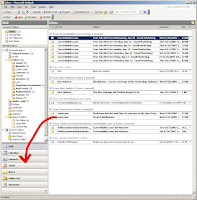 To use this feature, just select the email that has all the information you need, drag it over to the navigation pane (probably on the left of the Outlook interface) and drop it onto the "Task" button (click the image over there to see what I mean). A new task will pop up with the same subject as the email and the contents of the email in the task's body. The due date and start date of the task will default to today, the status to "Not Started," and the priority to "Normal." You can edit all this, as well as the Subject, save it and you're done.
The same thing can be done with the Calendar, however it will usually require more cleanup since it's likely you'll be sharing the meeting with other people.
The only real problem with this method is that attachments to the email don't automatically get attached to the task. However, I found a workaround for this using macros. I won't get into all of it because someone else already has here. If you know a little VBScript or are willing to get your hands a little dirty to figure it out, you can customize that macro to your heart's content. Then you just add the macro to your Outlook toolbar and any time you get an email with attachments relevant to the task, click the button and voila, the attachments automatically show up in the task!
Since most of the tasks I perform arrive via email, using the drag and drop method saves me from having to re-type information and, more importantly, because it's so easy I'm highly motivated to use it. This makes it almost impossible for me to forget to do something. A sidenote here: When someone calls me and asks me to do something, I will often ask them to send me an email about it instead. This might seem a little rude to people who prefer the phone, but it's really the best way to ensure everyone ends up getting what they want.
 To use this feature, just select the email that has all the information you need, drag it over to the navigation pane (probably on the left of the Outlook interface) and drop it onto the "Task" button (click the image over there to see what I mean). A new task will pop up with the same subject as the email and the contents of the email in the task's body. The due date and start date of the task will default to today, the status to "Not Started," and the priority to "Normal." You can edit all this, as well as the Subject, save it and you're done.
The same thing can be done with the Calendar, however it will usually require more cleanup since it's likely you'll be sharing the meeting with other people.
The only real problem with this method is that attachments to the email don't automatically get attached to the task. However, I found a workaround for this using macros. I won't get into all of it because someone else already has here. If you know a little VBScript or are willing to get your hands a little dirty to figure it out, you can customize that macro to your heart's content. Then you just add the macro to your Outlook toolbar and any time you get an email with attachments relevant to the task, click the button and voila, the attachments automatically show up in the task!
Monday, April 16, 2007
Desktoptwo, three, four!
Desktoptwo is a web-based "operating system" manifested in a desktop that you can access from anywhere. Unlike sites like Netvibes and Protopage, which serve up RSS feeds and widgets as panels, Desktoptwo mimics your PC's desktop, complete with programs like office applications (OpenOffice), chat and email clients, calendar, contacts, and even 1GB of free hard drive space. This is more of a workspace than a startpage. It's all driven by some slick Flash.
OpenOffice can open Microsoft Excel and Word documents fairly well so even if you're tied to Microsoft Office, you can still get work done. Files can be uploaded and downloaded from the "Hard Drive" program, which acts like Explorer.
If you upload a bunch of MP3s to Desktoptwo, you can play them from the interface using the MP3 Player. A nice way to keep your music handy. The player's pretty bare bones, but sounds fine.
There are some social features like a blog and a message board available if you share your desktop with others. Not sure I'd use this, it would be like sharing your PC with a bunch of people, but I imagine, like most online social things, the kids would like it.
The rest of the apps are basic and functional. Performance is excellent and I saw no delays or hiccups. I suspect more applications will be added before it gets out of beta. All in all it's a pretty slick program that I suspect will appeal to anyone switching PCs frequently.
OpenOffice can open Microsoft Excel and Word documents fairly well so even if you're tied to Microsoft Office, you can still get work done. Files can be uploaded and downloaded from the "Hard Drive" program, which acts like Explorer.
If you upload a bunch of MP3s to Desktoptwo, you can play them from the interface using the MP3 Player. A nice way to keep your music handy. The player's pretty bare bones, but sounds fine.
There are some social features like a blog and a message board available if you share your desktop with others. Not sure I'd use this, it would be like sharing your PC with a bunch of people, but I imagine, like most online social things, the kids would like it.
The rest of the apps are basic and functional. Performance is excellent and I saw no delays or hiccups. I suspect more applications will be added before it gets out of beta. All in all it's a pretty slick program that I suspect will appeal to anyone switching PCs frequently.
Saturday, April 14, 2007
How Should a Web Team Work?
Try as I might I've found little research on how a corporate Web team should be structured. Should developers work directly with front-end designers? Should content producers be involved in architecture? Should anyone other than IT know what's going on with the servers? I work in an environment where each element of the Web site is handled by different departments:
- Server maintenance
- Hard-core development (applications, eCommerce, etc)
- Database maintenance and development
- Front-end design and architecture
- Content development
- E-mail marketing
- Enterprise applications
These separate departments don't necessarily play well together and are rarely looped in on each others' plans or projects, operating largely in their own silos. Is this how it should be or should they all be under one, centrally-managed group?
How are other "Web Teams" structured? Bear in mind I'm not talking about agency Web teams, I mean Web teams internal to a corporation or association. These teams work together over the long haul and may evolve over time. They're not the streamlined, project-focused teams you'd find in agency and members may wear several hats and manage several different Web sites like intranets, extranets, external sites, enterprise applications, etc. They may be called on to handle the minutiae and whims of departments throughout the enterprise.
I've yet to see an optimal model for this kind of team, but I will keep looking.
12 Breeds of Client and How to Work with Them
Great list of client types and how to work with them. This is written for a Web design/tech audience, but can be applied elsewhere. Also, a commenter points to a similar article (in cartoon form even!)
12 Breeds of Client and How to Work with Them
12 Breeds of Client and How to Work with Them
Wednesday, April 11, 2007
The Gyroball
It's been a while since I've seen a new pitch introduced in baseball. Now, Daisuke Matsuzaka (aka "Dice-K"), a recent Japanese import for the Boston Red Sox has introduced American baseball to "The Gyroball." He's apparently one of the few players who can throw the pitch well enough to strike out professional hitters. Because of the arm motion required to get the proper spin, most pitchers can't throw it fast enough to get it by hitters. Apparently "Dice-K" is a rare talent.
For a complete scientific look at the pitch check out Bill Nye's article and to see it in action watch the video below. Very cool. Also, for a great guide to pitching check out "The Complete Pitcher."
For a complete scientific look at the pitch check out Bill Nye's article and to see it in action watch the video below. Very cool. Also, for a great guide to pitching check out "The Complete Pitcher."
Tuesday, April 10, 2007
My Mind Map Never Seems to Fold Properly
Since I'm in the process of taking a seminar on "Critical Thinking" which includes things like the Socratic Method and Mind Mapping, I thought I'd share a great Mind Mapping tool that I've discovered. It's called bubbl.us and it's a free online tool that helps you brainstorm ideas and build very snazzy Mind Map charts.
 To see an example of a Mind Map, click on the image to the right, which is a map for building a tree house (and also proof that I have no idea how to build a tree house).
The interface is intuitive and Web 2.0ish so can get up and creating within a few seconds. The keyboard strokes are simple and brilliant. Don't expect a whole lot of customization like adding pictures or special icons, just really clean, attractive shapes.
If you want to save your work of mind art, you can register (name, email, password) and then not only save it, but collaborate with others on it. Mind Maps are probably best created in a room with everyone sitting around a screen or whiteboard, but I'm curious to see how this concept translates to individuals collaborating in non-real time.
 To see an example of a Mind Map, click on the image to the right, which is a map for building a tree house (and also proof that I have no idea how to build a tree house).
The interface is intuitive and Web 2.0ish so can get up and creating within a few seconds. The keyboard strokes are simple and brilliant. Don't expect a whole lot of customization like adding pictures or special icons, just really clean, attractive shapes.
If you want to save your work of mind art, you can register (name, email, password) and then not only save it, but collaborate with others on it. Mind Maps are probably best created in a room with everyone sitting around a screen or whiteboard, but I'm curious to see how this concept translates to individuals collaborating in non-real time.
Monday, April 09, 2007
Merlin Mann: Won't You Listen What the Mann Says
I think Merlin Mann will eventually, and perhaps begrudgingly become a star. Mann does 43 Folders, 5ives, and now The Merlin Show which so far has featured interviews with talented musicians floating just below the RADAR. He has a natural interview style and is genuinely funny and humble. Merlin also appears on the This Week in Tech fairly often and offers a witty yet usually positive counterpoint to the regulars.
Thursday, April 05, 2007
The Art of Article Tools

A great trend we've seen on online newspaper and magazine sites, as well as many other sites that feature article content is the increased use of "Article Tools." Article tools include links or buttons like "Print This, " "Email This," "Increase/Decrease Font Size," etc. Some sites only include one or two (usually "Print" or "Send") while some like the excellent news site The International Herald Tribune go crazy with the concept, including things like "Clip This" for saving articles to your own private area.
I've put together a bunch of examples, which you can see by clicking on the image on the right there. As I mentioned recently regarding Younanimous.com, I have no problem with "clutter" and the more article tools I see the more I think the publisher wants to empower me to read the content the way I want.
Wednesday, April 04, 2007
Yahoo! Widgets: More of the Best
In a previous post that has easily been the most popular I've written, I mentioned some of the Yahoo! Widgets I've been using regularly. With the advent of Yahoo! Widgets 4.0 (which I'll look at more closely later) I've decided to mention a few more of the widgets I use regularly:
TachClock: A slickly designed and deceptively simple clock that pops up unobtrusively on the hour and/or half hour. No numbers, just tick-marks for the hours, minute and second.
PowerX: Another simple but elegant widget that allows easy one-click access to log off, shutdown, and restart. I use it every time I reboot.
ClipDrop: A handy clipboard tool that saves and displays as many clipboard items as you want. Click a copied snippet from the list and it's ready to paste.
Yahoo! Maps: I prefer Yahoo! Maps over Google Maps these days and this widget makes looking up locations and directions a snap. I just wish it connected directly to the "Broadband" version of Yahoo! Maps by default.
TachClock: A slickly designed and deceptively simple clock that pops up unobtrusively on the hour and/or half hour. No numbers, just tick-marks for the hours, minute and second.
PowerX: Another simple but elegant widget that allows easy one-click access to log off, shutdown, and restart. I use it every time I reboot.
ClipDrop: A handy clipboard tool that saves and displays as many clipboard items as you want. Click a copied snippet from the list and it's ready to paste.
Yahoo! Maps: I prefer Yahoo! Maps over Google Maps these days and this widget makes looking up locations and directions a snap. I just wish it connected directly to the "Broadband" version of Yahoo! Maps by default.
AfterVote (a.k.a. Younanimous), The Hardest Working Engine in the Search Business
I've been holding off on mentioning Younanimous.com because it was early, but now they've changed their name to "AfterVote" (which I just can't seem to like) and have been adding features every few seconds, so I guess now's as good a time as any.
 AfterVote is a social search engine, which I've already voiced my concerns about, but after talking to the guys at AfterVote, I think it just might work. I guess I was thinking a bit simplistically about the concept of voting search results up and down. With AfterVote, rankings will be based on more than the simple + or - voting system and they plan to adapt the alorithms as needed.
For instance, if you click on a result and don't like it, you will probably return to the results and click on another. The system logs that behavior and uses it to "passively" tally votes for or against the results. If you really like or hate the result, you can also vote with the + or - buttons. While they didn't elaborate further on how else they'll police the system, I'm sure they'll look for the same things sites like Digg look for.
In addition to the social ranking aspect, AfterVote includes a plethora of social Web widgets (this link is already out of date, but shows many of them) for sharing results via Del.icio.us, Digg, StumbleUpon, etc. and seeing where the result ranks on Alexa, Compete, Google PageRank, etc. These widgets can all be turned on and off as preferences dictate. Personally I like to leave all of it on because I have no issue with clutter.
Did I mention it's actually a metasearch engine pulling from Google, Yahoo!, and MSN and that it has links to cached sites for all three? There's also a widget for the Trust level of the site. I haven't figured out where that comes from yet, but then, at the rate they're adding features I may never have a complete grasp of what's going on.
The question becomes "How much is too much for the average user?" I think AfterVote, in its current form is extremely appealing to people like me who can't get enough "stuff" when it comes to search and the social Web. However, if this stuff is all turned on by default when they get out of beta, I'm a little worried more casual Web users might feel a bit overwhelmed and confused. And I would think that to take best advantage of the voting system mass appeal will be key. Perhaps there are enough people like me to make this a success. I'm hoping so, because I think this is a terrific tool.
 AfterVote is a social search engine, which I've already voiced my concerns about, but after talking to the guys at AfterVote, I think it just might work. I guess I was thinking a bit simplistically about the concept of voting search results up and down. With AfterVote, rankings will be based on more than the simple + or - voting system and they plan to adapt the alorithms as needed.
For instance, if you click on a result and don't like it, you will probably return to the results and click on another. The system logs that behavior and uses it to "passively" tally votes for or against the results. If you really like or hate the result, you can also vote with the + or - buttons. While they didn't elaborate further on how else they'll police the system, I'm sure they'll look for the same things sites like Digg look for.
In addition to the social ranking aspect, AfterVote includes a plethora of social Web widgets (this link is already out of date, but shows many of them) for sharing results via Del.icio.us, Digg, StumbleUpon, etc. and seeing where the result ranks on Alexa, Compete, Google PageRank, etc. These widgets can all be turned on and off as preferences dictate. Personally I like to leave all of it on because I have no issue with clutter.

Did I mention it's actually a metasearch engine pulling from Google, Yahoo!, and MSN and that it has links to cached sites for all three? There's also a widget for the Trust level of the site. I haven't figured out where that comes from yet, but then, at the rate they're adding features I may never have a complete grasp of what's going on.
The question becomes "How much is too much for the average user?" I think AfterVote, in its current form is extremely appealing to people like me who can't get enough "stuff" when it comes to search and the social Web. However, if this stuff is all turned on by default when they get out of beta, I'm a little worried more casual Web users might feel a bit overwhelmed and confused. And I would think that to take best advantage of the voting system mass appeal will be key. Perhaps there are enough people like me to make this a success. I'm hoping so, because I think this is a terrific tool.
Switching Startpages Part One

I'm considering a switch from Protopage to Netvibes as my start page mostly because of the dearth of snappy widgets available for Protopage. While Protopage has been adding them since the latest version went live, I generally don't find them very polished or useful. However, I've always preferred Protopage's highly configurable layout and, even more importantly, the ability to create custom mini HTML pages. I primarily use this feature to create link pages and I have them scattered all over my start page. Some examples are over there on the right.
Netvibes doesn't have a widget for creating mini HTML pages, which is part of the reason I haven't considered it. However, their Bookmarks widget is very cool and uses a tag system. So I figured out how to import my HTML link pages into the Netvibes Bookmarks widget (which was a pain in the ass!) and then tagged them all. The result means I have to click a tag and then the link, but it's not too bad and will just take some getting used to.
However, I've come to realize a major flaw in using Netvibes: page load time. Admittedly, I have a lot of stuff on my Netvibes start page, but it's no more than I have on Protopage. Individual RSS panels, for instance take twice as long to load on Netvibes. This means that every time I launch my browser I'll have to sit and wait before I can do anything. I'm going to try to slim down what I have on the page and see if that helps, but it could be a dealbreaker. Netvibes, I'm sure gets loads more traffic than Protopage, so the problem may not go away anytime soon.
Tuesday, March 27, 2007
A Big Reason Most TV Shows and Movies Suck
We went to see "The Last Mimzy" over the weekend and before you ask "Why?" I'll only say my fiancee and I were taken in by the trailers which hinted at an "E.T."-like classic story with novel special effects and neither of us felt like being intellectually challenged on a Sunday. Needless to say, we probably should have Tivo'ed the trailer and watched it over and over 120 times instead of seeing the actual movie. I think the most entertaining thing about it was playing "Count the Product Placements!" In fact "Mimzy" featured the most blatant non-joke product placement possibly in the history of cinema. Way to go Intel. I think ticket prices should be discounted based on the number of product placements. In the case of "Mimzy" the theater should just send us a check for $32.50.
Anyway, my point wasn't about product placement or how execrable "The Last Mimzy" was. Mimzy, like most movies and TV shows suffered from the "stereotype of running time." That is to say, "this is a movie and therefore it should run about this long." Or "this is a TV show and therefore it should run this long." Unfortunately, many stories need a lot more than 90 minutes to unravel their plots and characters. By the same token, many films need only a few minutes. I suspect "Norbit" might have been better as a five minute YouTube clip. We'll watch as long as we're entertained and engrossed.
While lately TV shows have become serialized in their approach to storytelling ("Heroes," "24," "Lost," etc.), they're still missing the point. TV shows like these run as long as the network can suck money from them. Most of today's serial shows have a central mystery and this lack of a known run length must drive writers crazy. Will it end this year, next year, or five years from now? How much filler do we need to add? How much can we flatten this story arc? Alias seemed to suffer from this. The first two seasons hinged on discovering a lost artifact. When they found the lost artifact there was really nowhere to go except off the air. "Lost" is a good show but it's heavily padded. Some scenes just lay there, bereft of plot or meaning, but they help stretch the series out.
The last example I'll share is local TV News. Some nights there is truly not enough news to fill the 30 minutes. This means we get fluff stories about colorful senior citizens and pets that can sing. How about we make a rule that local TV news is as long as it has to be. No more real news 15 minutes into the broadcast? Well, then sign off and let's move on to the next thing.
Anyway, my point wasn't about product placement or how execrable "The Last Mimzy" was. Mimzy, like most movies and TV shows suffered from the "stereotype of running time." That is to say, "this is a movie and therefore it should run about this long." Or "this is a TV show and therefore it should run this long." Unfortunately, many stories need a lot more than 90 minutes to unravel their plots and characters. By the same token, many films need only a few minutes. I suspect "Norbit" might have been better as a five minute YouTube clip. We'll watch as long as we're entertained and engrossed.
While lately TV shows have become serialized in their approach to storytelling ("Heroes," "24," "Lost," etc.), they're still missing the point. TV shows like these run as long as the network can suck money from them. Most of today's serial shows have a central mystery and this lack of a known run length must drive writers crazy. Will it end this year, next year, or five years from now? How much filler do we need to add? How much can we flatten this story arc? Alias seemed to suffer from this. The first two seasons hinged on discovering a lost artifact. When they found the lost artifact there was really nowhere to go except off the air. "Lost" is a good show but it's heavily padded. Some scenes just lay there, bereft of plot or meaning, but they help stretch the series out.
The last example I'll share is local TV News. Some nights there is truly not enough news to fill the 30 minutes. This means we get fluff stories about colorful senior citizens and pets that can sing. How about we make a rule that local TV news is as long as it has to be. No more real news 15 minutes into the broadcast? Well, then sign off and let's move on to the next thing.
Subscribe to:
Posts (Atom)