We got a mention from The Generator Blog, which we appreciate. They featured our Froo Froo Menu Generator and drove us some nice traffic.
The Generator Blog features a crapload of generators so be sure to check them out. Especially if you're into those generators that create images with your text like the Beer Label Generator or the Bling Necklace Generator.
Monday, May 14, 2007


The Local Headline Generator
 We're getting into a regular rhythm at Generator Land with a new generator launching today which I'll get to in a moment. We've also made some other changes to the site including adding a Top Rated Generators area, an RSS feed, an archive, and a few minor tweaks to cinch it up and hunker down.
The latest addition to our growing family is The Local Headline Generator. Given the similarity of small town newspaper headlines it seemed a natural to randomize. We took a list of odd small town names and mixed them with a common headline format and hit the random button. You can check out the results at Generator Land right this second.
Traffic is quickly building at the site and we thank you all for your support!
Friday, May 11, 2007
Alan Graham Seems to Agree About Subscription Music
I said this a few days ago, and it seems ZDNet's Alan Graham agrees. From Alan:
"You see, when Sonos started to support Rhapsody, I fell in love with the subscription model. In fact, since I became a Rhapsody subscriber 8 months ago, I haven't purchased a single iTunes track. Amazingly, I haven't even played a single track of music from my own music library (which includes a lot of tracks I bought from iTunes). Not once…in 8 months! My NAS drive just sits there on the shelf…lonely…and pointless. I just can't bring myself to purchase albums based on 30-second samples, when I can go on Rhapsody and listen to the entire album anytime I like."
Read Alan's Whole Post
"You see, when Sonos started to support Rhapsody, I fell in love with the subscription model. In fact, since I became a Rhapsody subscriber 8 months ago, I haven't purchased a single iTunes track. Amazingly, I haven't even played a single track of music from my own music library (which includes a lot of tracks I bought from iTunes). Not once…in 8 months! My NAS drive just sits there on the shelf…lonely…and pointless. I just can't bring myself to purchase albums based on 30-second samples, when I can go on Rhapsody and listen to the entire album anytime I like."
Read Alan's Whole Post
Tuesday, May 08, 2007
Ridiculous Restaurant Menus in Seconds

Our latest generator at Generator Land is the "Froo Froo Menu Generator." It randomly produces a hoity toity-sounding dinner menu that, upon closer inspection is usually a bit disgusting (for instance "Jerked Mongoose with a Cask-Conditioned Mayonnaise.")
Please check it out and leave a rating and comment either positive or negative. Unfortunately, because we just finished building our own rating system, we had to start from scratch with the comments and ratings. Growing pains I guess!
Saturday, May 05, 2007
Commenting on More YouTube Lawsuits
(Note: This is from a comment I made about YouTube on Profy.com. And don't worry, I have my own permission to re-use it.)
I think netizens have been spoiled by free content into thinking that they have an inherent right to get whatever they want whenever they want it. It’s certainly an easy state of mind to fall into. Copyrighted music and movie sharing on P2P networks is stealing and so is substantive re-use and gain from copyrighted content without the copyright-holder’s permission. I can’t strictly define “substanative” other than to say that showing a thumbnail image of a video wouldn’t be “substanative” but showing a certain amount of the video itself would be. Copyright holders get to make the call on if it’s fair use. Some might like the attention/marketing aspect of it, but some might not. Lately, not so much.
It seems that a site that simply aggregates links and information about videos on other sites in a user-centric way would be a smarter model than simply showing the videos directly. I assume those sites are out there. These sites can drive traffic to the copyright holders’ sites, which is what they want, and could provide the centralized hub that users want. Do we need to see it directly on the “hub” itself? Not really. Content sites just need to get their collective act together and create better, more user-centric sites while working with these hubs as much as possible.
YouTube should continue to aggregate user-generated content and video provided to them directly by copyright holders, but they need to get some common sense and quit acting like what they’re allowing on their site is something other than copyright infringement. Just because people want it doesn’t mean you should do it.
Friday, May 04, 2007
Steve Jobs is Back to Being an Idiot
 I'm not sure what Steve Jobs was basing his comments on, but he seems to think that no one is interested in subscription music. Regardless of the fact that I am a huge fan of subscription music in and of itself, I think he's missing the point.
Subscription music services like Rhapsody don't JUST "rent" music, you can also purchase it forever if you want to. I burn a few CDs a month from Rhapsody and the per song cost is cheaper than iTunes. Subscribing doesn't mean you can't own whatever music you want, it means you get more music. Who wouldn't want that?
So while I do buy songs outright sometimes, mostly I just load up my MP3 player with as much music as I want, I stream as much music as I want, etc. I can listen to any album or song anytime in its entirety. I probably listen to music an average of six hours a day between my commute, the office, and on weekends and I never run out of new stuff to listen to. The thought of using a service where I have to buy every song I listen to for .99 cents seems ludicrous to me now.
Thursday, May 03, 2007
Super Hero Name Generator
 Things are moving along at Generator Land. We just created and posted our first homegrown generator called "The Super Hero Name Generator." I think it turned out pretty well. It's a good waste of at least 15 minutes of your valuable time.
We've got a few more in the works and our goal is to add at least one new generator each day. If you visit, feel free to rate and comment on what we post. You can also submit good generators you've come across. Everyone seems to know of at least one.
Wednesday, May 02, 2007
Map Your Site the Web 2.0 Way
 WriteMaps is a basic Web sitemap outlining tool. It's low-frills but produces nice-looking sitemaps, good for planning out the architecture of your site. You start with a single page and build on it using the plus or minus icons on each new page. Branches can be collapsed easily. You can switch to an outline view instead of the icon-based view and zoom in and out with a slider bar.
And that's about it. Sitemaps can't be exported to any format (XML would be nice) and can't be downloaded. You can only print. In theory this might be a nice way to share sitemaps among team members, but there aren't any annotation or markup tools. This is clearly aimed at less technical users as developers, who are used to more complex tools like Visio, may feel limited. However, less technical users may enjoy the straightforward functionality.
Monday, April 30, 2007
Generator Land: Le Randomness Rule
After seeing how popular random generators are on the Web I felt it was my duty to create a site that brings them all together. I'm calling it "Generator Land." I'll be collecting all the sites that create fake band names, game characters, business speak, haikus, biblical curses, etc. and putting them under one roof so they can fight amongst themselves about who left the dirty dishes in the fishtank and who saw who's girlfriend getting out of the shower "by mistake."
In addition I'll let users rate them and comment on them so my opinion won't be the only one that matters. Don't expect too much right off as I begin collecting, but I hope to eventually collect enough random generators to make repeated visits a must.
If you know of any random generators, let me know on the blog here or submit them at Generator Land. I can't pay you, but I will say a prayer for your immortal soul. Or I'll at least generate a prayer with the Random Prayer Generator (if I can find one).
In addition I'll let users rate them and comment on them so my opinion won't be the only one that matters. Don't expect too much right off as I begin collecting, but I hope to eventually collect enough random generators to make repeated visits a must.
If you know of any random generators, let me know on the blog here or submit them at Generator Land. I can't pay you, but I will say a prayer for your immortal soul. Or I'll at least generate a prayer with the Random Prayer Generator (if I can find one).
Thursday, April 26, 2007
A Devastatingly Good Video About Vanity and the Media
This is some incredible animation work and a poignant comment on society as well. Enjoy.
read more | digg story
read more | digg story
Tuesday, April 24, 2007
Flash Earth: Keeping it Simple
Flash Earth is a very straightforward and fast satellite image maps with one-click switching between the various map service images. It's actually a good way to see the differences in quality between them (Google wins). Easy navigation, zoom and rotation. It has a location finder, but I couldn't seem to get it to find any street addresses. Zip codes worked fine.
Flash Earth ...satellite and aerial imagery of the Earth in Flash
Flash Earth ...satellite and aerial imagery of the Earth in Flash
Monday, April 23, 2007
Virtual desktop trifecta at Web 2.0 Expo | Webware : Cool Web apps for everyone
As a follow-up to my post about Desktoptwo, I just ran across a week-old post at WebWare reviewing three similar services: Zcubes, G.ho.st, and Sparc. I seem to remember looking at Zcubes a while back and finding it a bit sloppy, but perhaps I'll go back and have a look.
Virtual desktop trifecta at Web 2.0 Expo Webware : Cool Web apps for everyone
Virtual desktop trifecta at Web 2.0 Expo Webware : Cool Web apps for everyone
MiniBoxs Misses "E" and the Mark
Another competitor for the likes of OriginalSignal and PopURLs is MiniBoxs (what happened to the "e?") which is an RSS aggregator billing itself as the "Net's first RSS magazine." If that's what this is, then I don't think they're the first.
It's a nice-looking site and the editors do a good job of choosing feeds to include. I like the Buzz! page, which aggregates the most popular items from many social news sites like Digg, Reddit, Del.icio.us, Furl, TailRank, etc. This is similar to other sites of this type, but they have a pretty comprehensive list here.
It's a nice-looking site and the editors do a good job of choosing feeds to include. I like the Buzz! page, which aggregates the most popular items from many social news sites like Digg, Reddit, Del.icio.us, Furl, TailRank, etc. This is similar to other sites of this type, but they have a pretty comprehensive list here.
All in all, I prefer PopURLs and OriginalSignal, but my true preference will likely always be rolling my own.
MiniBoxs Buzz!
Saturday, April 21, 2007
Weather.com Maps Smooth Like Buttah
If you haven't already noticed, weather.com has a new weather map in beta and it's very slick. Imagine GoogleMaps, with all its click-and-drag/scrollwheel zoom goodness with weather overlayed.
You can choose clouds and/or RADAR images with transparency, add roads, and animate. The interface is smooth like butter. I still prefer Accuweather overall, but Weather.com scores points here.
Weather Radar and Weather Maps - weather.com
You can choose clouds and/or RADAR images with transparency, add roads, and animate. The interface is smooth like butter. I still prefer Accuweather overall, but Weather.com scores points here.
Weather Radar and Weather Maps - weather.com
Friday, April 20, 2007
Curse Your Enemies with Biblical Authority
Insults with pious panache, courtesy of Ship of Fools. My current favorite:
"Take heed, O ye of little faith, for you will be pursued into the mountains by sex-mad baboons!"
Ship of Fools: Biblical curse generator
"Take heed, O ye of little faith, for you will be pursued into the mountains by sex-mad baboons!"
Ship of Fools: Biblical curse generator
Top 10 Reasons as to why I still need to be convinced about marketing on Second Life
HP's Eric Kintz makes some great points about Second Life here, some of which I echoed a while back. I agree that the potential for marketing may still be there and, more importantly, a sustainable user environment may still be there, but I think SecondLife 3.0 needs a lot of work.
Top 10 Reasons as to why I still need to be convinced about marketing on Second Life
Top 10 Reasons as to why I still need to be convinced about marketing on Second Life
Microsoft entices beta testers with Windows Media Center update
Microsoft entices beta testers with Windows Media Center update
4/19/2007 7:30:00 pm

It was but three months ago that Microsoft opened the flood gates to beta signups for Windows Live for TV, and now the mega-corp is soliciting the help of free laborers yet again to test out a potentially buggy and likely frustrating piece of forthcoming software. If you're still intrigued, Microsoft is holding an open signup to beta test Windows Media Center update for Vista, but we certainly hope you weren't counting on even a partial list of features, as the curiously bland signup page doesn't relinquish much of anything beyond procedural instructions. So if you're hankering for something new to try out, and don't mind replying to Microsoft's "surveys, bug reports, and other means as required," feel free to hit the read link and toss your name in the hat.
[Via BoyGeniusReport]
![]()
![]()
![]()
Ugh, how bad will the new Windows Media Center be? I switched to BeyondTV after about a month of wrestling with Media Center and I haven't looked back.
4/19/2007 7:30:00 pm
Filed under: Desktops, HDTV, Home Entertainment, Media PCs
It was but three months ago that Microsoft opened the flood gates to beta signups for Windows Live for TV, and now the mega-corp is soliciting the help of free laborers yet again to test out a potentially buggy and likely frustrating piece of forthcoming software. If you're still intrigued, Microsoft is holding an open signup to beta test Windows Media Center update for Vista, but we certainly hope you weren't counting on even a partial list of features, as the curiously bland signup page doesn't relinquish much of anything beyond procedural instructions. So if you're hankering for something new to try out, and don't mind replying to Microsoft's "surveys, bug reports, and other means as required," feel free to hit the read link and toss your name in the hat.
[Via BoyGeniusReport]
Read | Permalink | Email this | Comments
BOLD MOVES: THE FUTURE OF FORD A new documentary series. Be part of the transformation as it happens in real-time

Office Depot Featured Gadget: Xbox 360 Platinum System Packs the power to bring games to life!
Ugh, how bad will the new Windows Media Center be? I switched to BeyondTV after about a month of wrestling with Media Center and I haven't looked back.
Thursday, April 19, 2007
PopURLs Let's You Have It Yor Way
 Since I was on the subject of "article tools" a few weeks back I thought I'd mention a similar concept alive and well at news aggregator, PopURLs.com. The site lets you basically take over and transform it however you want. The menu bar (shown on the right) lets you easily:
- Switch to a black background
- Switch to popflow (a one column format)
- Switch to big text
- Switch to Buzzmania (more news items)
- Turn off story previews
- Turn off video/audio feeds
- Open links in the same window
- Customize feed arrangement
- Open scrapbook
I am impressed anytime a Web site's designers let you mess with their work to suit your needs and it would be nice if more did. Thanks to CSS and AJAX these kind of user-focused controls are easier to build and thanks to the Time Person of the year (you) there are more sites taking it seriously.
Wednesday, April 18, 2007
Drag and Drop: Turning an Outlook Email into a Task
With software as complex and feature-heavy as Microsoft Outlook, it's easy to remain unaware of everything it can do. One of the Outlook features people still seem surprised about when I tell them is the fact that you can drag and drop an email to transform it into a task or meeting request. I use this feature many times each day and while Outlook's Tasks program isn't the greatest in the world (that honor goes to TaskPilot), it's fairly powerful and awfully convenient if you already use Outlook most of the time.
Since most of the tasks I perform arrive via email, using the drag and drop method saves me from having to re-type information and, more importantly, because it's so easy I'm highly motivated to use it. This makes it almost impossible for me to forget to do something. A sidenote here: When someone calls me and asks me to do something, I will often ask them to send me an email about it instead. This might seem a little rude to people who prefer the phone, but it's really the best way to ensure everyone ends up getting what they want.
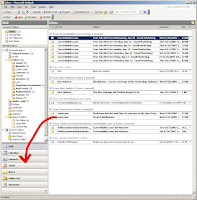 To use this feature, just select the email that has all the information you need, drag it over to the navigation pane (probably on the left of the Outlook interface) and drop it onto the "Task" button (click the image over there to see what I mean). A new task will pop up with the same subject as the email and the contents of the email in the task's body. The due date and start date of the task will default to today, the status to "Not Started," and the priority to "Normal." You can edit all this, as well as the Subject, save it and you're done.
The same thing can be done with the Calendar, however it will usually require more cleanup since it's likely you'll be sharing the meeting with other people.
The only real problem with this method is that attachments to the email don't automatically get attached to the task. However, I found a workaround for this using macros. I won't get into all of it because someone else already has here. If you know a little VBScript or are willing to get your hands a little dirty to figure it out, you can customize that macro to your heart's content. Then you just add the macro to your Outlook toolbar and any time you get an email with attachments relevant to the task, click the button and voila, the attachments automatically show up in the task!
Since most of the tasks I perform arrive via email, using the drag and drop method saves me from having to re-type information and, more importantly, because it's so easy I'm highly motivated to use it. This makes it almost impossible for me to forget to do something. A sidenote here: When someone calls me and asks me to do something, I will often ask them to send me an email about it instead. This might seem a little rude to people who prefer the phone, but it's really the best way to ensure everyone ends up getting what they want.
 To use this feature, just select the email that has all the information you need, drag it over to the navigation pane (probably on the left of the Outlook interface) and drop it onto the "Task" button (click the image over there to see what I mean). A new task will pop up with the same subject as the email and the contents of the email in the task's body. The due date and start date of the task will default to today, the status to "Not Started," and the priority to "Normal." You can edit all this, as well as the Subject, save it and you're done.
The same thing can be done with the Calendar, however it will usually require more cleanup since it's likely you'll be sharing the meeting with other people.
The only real problem with this method is that attachments to the email don't automatically get attached to the task. However, I found a workaround for this using macros. I won't get into all of it because someone else already has here. If you know a little VBScript or are willing to get your hands a little dirty to figure it out, you can customize that macro to your heart's content. Then you just add the macro to your Outlook toolbar and any time you get an email with attachments relevant to the task, click the button and voila, the attachments automatically show up in the task!
Monday, April 16, 2007
Desktoptwo, three, four!
Desktoptwo is a web-based "operating system" manifested in a desktop that you can access from anywhere. Unlike sites like Netvibes and Protopage, which serve up RSS feeds and widgets as panels, Desktoptwo mimics your PC's desktop, complete with programs like office applications (OpenOffice), chat and email clients, calendar, contacts, and even 1GB of free hard drive space. This is more of a workspace than a startpage. It's all driven by some slick Flash.
OpenOffice can open Microsoft Excel and Word documents fairly well so even if you're tied to Microsoft Office, you can still get work done. Files can be uploaded and downloaded from the "Hard Drive" program, which acts like Explorer.
If you upload a bunch of MP3s to Desktoptwo, you can play them from the interface using the MP3 Player. A nice way to keep your music handy. The player's pretty bare bones, but sounds fine.
There are some social features like a blog and a message board available if you share your desktop with others. Not sure I'd use this, it would be like sharing your PC with a bunch of people, but I imagine, like most online social things, the kids would like it.
The rest of the apps are basic and functional. Performance is excellent and I saw no delays or hiccups. I suspect more applications will be added before it gets out of beta. All in all it's a pretty slick program that I suspect will appeal to anyone switching PCs frequently.
OpenOffice can open Microsoft Excel and Word documents fairly well so even if you're tied to Microsoft Office, you can still get work done. Files can be uploaded and downloaded from the "Hard Drive" program, which acts like Explorer.
If you upload a bunch of MP3s to Desktoptwo, you can play them from the interface using the MP3 Player. A nice way to keep your music handy. The player's pretty bare bones, but sounds fine.
There are some social features like a blog and a message board available if you share your desktop with others. Not sure I'd use this, it would be like sharing your PC with a bunch of people, but I imagine, like most online social things, the kids would like it.
The rest of the apps are basic and functional. Performance is excellent and I saw no delays or hiccups. I suspect more applications will be added before it gets out of beta. All in all it's a pretty slick program that I suspect will appeal to anyone switching PCs frequently.
Subscribe to:
Posts (Atom)