I was talking to a friend at work yesterday who I was surprised to find out was "really getting into podcasts." She isn't a technically savvy person (I've had to help her with PowerPoint) so I was shocked to hear her regale me with a list of her favorites podcasts, including the excellent National Geographic collection. She explained that she found them all on iTunes and then began to tell me how much she loved her iPod. I showed her my new Sandisk Sansa player, which is easily the best Media player I've used to date, which she thought was cool, but she thought for "non-techies" like her, the iPod was the way to go. I asked what she meant and she said "The iPod is just so easy to use." I showed her how I plug my Sansa into the PC, Rhapsody pops up, and I start dragging and dropping music onto it. "How is the iPod easier than that?" She stuck by her story that non-techies should get iPods. "But isn't that exactly what you do with your iPod?" She just shook her head and said "iPods are just easier."
So I thought about it and realized that the truth really doesn't matter in fashion. iPods have the perception of being simple so they're simple. Never mind the fact that these days there are many media players just as simple and with less gotchas and hardware issues than iPods. It doesn't matter. iPods are simple.
As Microsoft prepares to roll out its new Zune Media player I hope they realize this. Brand the Zune as the "simple choice." Downlplay the features, and focus on its simplicity. Keep the Zune music store and the transfer process simple. Simple, simple, simple. Run it through the "Mom" process. Can my Mom use it? Does my Mom get it? If not, start over.
Saturday, September 30, 2006


Tuesday, August 29, 2006
Leaving Outlook's Tasks Behind?
I'm taking the plunge off the Outlook cliff and trying out a standalone task management program featured on LifeHacker. It's called TaskCoach and it's a free, open source program available for download from SourceForge.
So far I'm liking it. It's relatively straightforward, but, unlike Outlook, let's you easily create sub-tasks. It also offers an uncluttered view of your daily tasks with easily configured views via a "Filter Side Bar." This ease-of-view is a revelation compared to Outlook. Basically it's a one-click process to see tasks by category or status. Brilliant!
TaskCoach handily minimizes to the taskbar when closed or minimized for easy access as you work. In addition it has built-in effort timers (which I hope I never feel compelled to use, but it would probably be for the best).
The author actively solicits ideas for improvements, which gives me hope that one day it will become even better. I already have a few suggestions to make including templates, drag and drop functions, and the ability to set a default attachment folder.
Anyway, I'm going to try it out for a week and see if I can handle losing the biggest plus of using Outlook for task management, which is the fact that I can drag and drop an e-mail to create a new task, complete with the body of the e-mail. A handy VB script I found even lets me include attachments. This really has been my only reason for sticking with Outlook. However, I can already tell that if TaskCoach offered the ability to drag and drop e-mails to create tasks I'd be sold already.
So far I'm liking it. It's relatively straightforward, but, unlike Outlook, let's you easily create sub-tasks. It also offers an uncluttered view of your daily tasks with easily configured views via a "Filter Side Bar." This ease-of-view is a revelation compared to Outlook. Basically it's a one-click process to see tasks by category or status. Brilliant!
TaskCoach handily minimizes to the taskbar when closed or minimized for easy access as you work. In addition it has built-in effort timers (which I hope I never feel compelled to use, but it would probably be for the best).
The author actively solicits ideas for improvements, which gives me hope that one day it will become even better. I already have a few suggestions to make including templates, drag and drop functions, and the ability to set a default attachment folder.
Anyway, I'm going to try it out for a week and see if I can handle losing the biggest plus of using Outlook for task management, which is the fact that I can drag and drop an e-mail to create a new task, complete with the body of the e-mail. A handy VB script I found even lets me include attachments. This really has been my only reason for sticking with Outlook. However, I can already tell that if TaskCoach offered the ability to drag and drop e-mails to create tasks I'd be sold already.
Thursday, June 15, 2006
A Cloudy Feature
I think tag clouds are pretty cool, but try as I might, I haven't seen much use for them. The problem is that they're usually pretty much the same. The big words are obvious.
Tech tag clouds show "Microsoft," "Google," "Apple," etc.
News tag clouds show "Bush," "Iran," "Iraq," "US," etc.
I've never really felt compelled to click on tags in a tag cloud because the tags are either too general or too boring.
What would be cool, and perhaps someone's done this, is if when you clicked on a tag in a tag cloud, it brought you to a new, more specific tag cloud with related tags. Something LIKE that exists, called Google News Cloud. However, rather than successive mini-clouds, it simply highlights related tags.
I'd like to see something similar to the wonderful Visual Thesaurus tool.
Tech tag clouds show "Microsoft," "Google," "Apple," etc.
News tag clouds show "Bush," "Iran," "Iraq," "US," etc.
I've never really felt compelled to click on tags in a tag cloud because the tags are either too general or too boring.
What would be cool, and perhaps someone's done this, is if when you clicked on a tag in a tag cloud, it brought you to a new, more specific tag cloud with related tags. Something LIKE that exists, called Google News Cloud. However, rather than successive mini-clouds, it simply highlights related tags.
I'd like to see something similar to the wonderful Visual Thesaurus tool.
Friday, May 26, 2006
Mmmmmm, Del.icio.us
I've been a fan of Del.icio.us for a few months now. I originally found it very odd and unintuitive, but I've warmed up to it over time. Especially since I installed the Firefox plug-in that makes adding bookmarks a snap.
I still think it might be a bit obscure for the casual Web user though. I think the problem lies with what I assume is an attempt to over simplify the experience. I say this because I've sent people to the site and their first comment tends to be "So what are all these links?" (actually, their first comment is usually more like "Delicious? So is it www.delicious.com? What? del.icio.us? I don't get it." Note to Yahoo, who recently purchased Del.icio.us, consider a name/URL change. It was cute for a while there, but...)
One of the reasons I've become so enamored of it is what you can DO with your bookmarks once you start collecting them. You can put them in an RSS feed for instance. Or you can send someone all the bookmarks you have tagged with, say "recipes" just buy sending them a link to http://del.icio.us/username/recipes.
Another example: I recently did a bunch of research on podcasting directories because we were in the process of launching podcasts for my company. Every time I found a directory we might want to post our podcast in, I clicked my Del.icio.us button, described the site and tagged it with "podcast" and "directories." When it came time to share what I found with my boss, I just sent her a link to http://del.icio.us/napdynmite/podcast+directories (feel free to click on that, it works).
I also like the fact that I can tag bookmarks with the names of people in my network and they'll get my bookmark in their inbox automatically. Great for team research as well as just fun.
Anyway, check it out at http://del.icio.us/ if you haven't already. Make sure to get the browser buttons here: http://del.icio.us/help/. It makes the whole process seamless and almost habitual.
I still think it might be a bit obscure for the casual Web user though. I think the problem lies with what I assume is an attempt to over simplify the experience. I say this because I've sent people to the site and their first comment tends to be "So what are all these links?" (actually, their first comment is usually more like "Delicious? So is it www.delicious.com? What? del.icio.us? I don't get it." Note to Yahoo, who recently purchased Del.icio.us, consider a name/URL change. It was cute for a while there, but...)
One of the reasons I've become so enamored of it is what you can DO with your bookmarks once you start collecting them. You can put them in an RSS feed for instance. Or you can send someone all the bookmarks you have tagged with, say "recipes" just buy sending them a link to http://del.icio.us/username/recipes.
Another example: I recently did a bunch of research on podcasting directories because we were in the process of launching podcasts for my company. Every time I found a directory we might want to post our podcast in, I clicked my Del.icio.us button, described the site and tagged it with "podcast" and "directories." When it came time to share what I found with my boss, I just sent her a link to http://del.icio.us/napdynmite/podcast+directories (feel free to click on that, it works).
I also like the fact that I can tag bookmarks with the names of people in my network and they'll get my bookmark in their inbox automatically. Great for team research as well as just fun.
Anyway, check it out at http://del.icio.us/ if you haven't already. Make sure to get the browser buttons here: http://del.icio.us/help/. It makes the whole process seamless and almost habitual.
Friday, February 24, 2006
Now That's a Start!
For years I've built my own start pages, which originally start out simply as an HTML page full of my favorite links but eventually becomes festooned with with whatever knick-knacks I find. I used the Accuweather widget, the Symantec Virus Alert widget, the Last.fm song widget, customized Gigablast search forms, FeedDigest RSS widgets, and yes, even a TagCloud.com tagcloud. I put a lot of time and effort into these creations and putter over them incessantly, moving things around, removing things that I don't use, adding new things I've found, changing colors, adding graphics. Truly a labor of love, or, more likely, the result of a horribly short attention span.
The other day I followed up on a note to myself to check out a site called protopage.com. Protopage is, basically, a startpage creator. You register on the site and then are presented with a screen full of components that you can add, remove, edit, move around, and, yes, putter over. For instance, you can add newsfeeds, widgets like weather forecasters, link favorites, or Inbox monitors and you have some control over how much of each component looks and acts. It saves your page layout on the fly and if you leave and come back it looks just like you left it. Thanks to AJAX, this stuff is all pretty slick and responsive. I created my own protopage and was very happy with it. I had about 12 newsfeeds, a bunch of link favorites, a weather widget and an Inbox monitor for one of my POP accounts. And it looked great.
So, in a small ceremony I officially dumped my previous, homemade html page for my slick new protopage (of course Microsoft Antispyware fought me tooth and nail for trying to change IE's startpage, but more on that another time). So everything, it seemed was hunky-dory. Then I noticed a blurb about something called "Pageflakes" in a Digg.com posting. Apparently Pageflakes was similar to Protopage. So I checked it out. Turns out Pageflakes is pretty cool too. I built a startpage with Pageflakes and saw that it actually seems to have even more widgets than Protopage, including tagclouds from del.icio.us, TV Guides, an SMS sender, even something called a U.S. Debt clock. Well now, maybe I should take a hard look at this.
My next entry will be a review of the startpages out there, including Protopage, Pageflakes, Eskobo, Goowy, and NetVibes.
The other day I followed up on a note to myself to check out a site called protopage.com. Protopage is, basically, a startpage creator. You register on the site and then are presented with a screen full of components that you can add, remove, edit, move around, and, yes, putter over. For instance, you can add newsfeeds, widgets like weather forecasters, link favorites, or Inbox monitors and you have some control over how much of each component looks and acts. It saves your page layout on the fly and if you leave and come back it looks just like you left it. Thanks to AJAX, this stuff is all pretty slick and responsive. I created my own protopage and was very happy with it. I had about 12 newsfeeds, a bunch of link favorites, a weather widget and an Inbox monitor for one of my POP accounts. And it looked great.
So, in a small ceremony I officially dumped my previous, homemade html page for my slick new protopage (of course Microsoft Antispyware fought me tooth and nail for trying to change IE's startpage, but more on that another time). So everything, it seemed was hunky-dory. Then I noticed a blurb about something called "Pageflakes" in a Digg.com posting. Apparently Pageflakes was similar to Protopage. So I checked it out. Turns out Pageflakes is pretty cool too. I built a startpage with Pageflakes and saw that it actually seems to have even more widgets than Protopage, including tagclouds from del.icio.us, TV Guides, an SMS sender, even something called a U.S. Debt clock. Well now, maybe I should take a hard look at this.
My next entry will be a review of the startpages out there, including Protopage, Pageflakes, Eskobo, Goowy, and NetVibes.
Saturday, February 04, 2006
Taskbar Bullies
One thing that hasn't changed on our desktops in a decade is the fact that many programs we install demand to live in our taskbars. Even seemingly innocuous programs with no legitimate reason for remaining "always on." For instance, why does Quicktime feel the need to maintain constant activity in my taskbar without asking. Is there something I desperately need from Apple that requires this constant tether. If it might need to update itself periodically, why can't it wait until I launch it and then tell me there's a newer version? Anyway, here's a list of the biggest "Taskbar Bullies" that I've run into. All of them suddenly appeared in my taskbar and fought to stay there, despite my attempts to turn them off, edit my startup list, or change options in their program. By the way, get StartUp Cop or something similar if you don't already have it.
Aggressive
Aggressive
- QuickTime
- RealPlayer
- MSN Messenger
- AOL Instant Messenger
- Yahoo! Instant Messenger
- HP Printer Drivers
- Picasa
Friday, February 03, 2006
What I Think of "What the Nation Thinks"
I ran across this site while doing some research and ended up hanging around for way too long. It's called "What the Nation Thinks" and it's a collection of opinion polls. You can submit polls or take them. Fortunately someone reviews them before publishing (at least they claim to) so there's not a lot of childish attempts to get attention (although there is one up there currently about bra-sizes, but it's actually not a bad question I suppose.)
From the homepage you can look at polls by how popular, "hot", or new they are. There are also categories (which you assign when submitting a poll) or you can search. The interface is really nice and straightforward, as well as easy on the eyes.
I don't know if this is a Web 2.0 kind of thing, but if Digg.com is then I don't see why this wouldn't be. Even though it looks like it started a few years ago. In any event it's a nice way of checking out public opinion and killing a whole lot of time.
http://www.whatthenationthinks.com/UK/default.asp
From the homepage you can look at polls by how popular, "hot", or new they are. There are also categories (which you assign when submitting a poll) or you can search. The interface is really nice and straightforward, as well as easy on the eyes.
I don't know if this is a Web 2.0 kind of thing, but if Digg.com is then I don't see why this wouldn't be. Even though it looks like it started a few years ago. In any event it's a nice way of checking out public opinion and killing a whole lot of time.
http://www.whatthenationthinks.com/UK/default.asp
Friday, January 27, 2006
My Firefox Extensions
Since everyone else is doing it, why not me. Here are the Firefox extensions I'm using (thanks to the ListZilla extension, exporting the list was simple):
ColorZilla 0.8.2
Copy Links 0.1.3
CustomizeGoogle 0.41
DictionarySearch 1.5
Forecastfox 0.8.2.5
Greasemonkey 0.6.4
Linkification 1.1.9
ListZilla 0.7
MeasureIt 0.3.5
OpenBook 1.3.4
PDF Download 0.6
Saferfox Xpanded 3.2.2
Tab X 0.9.2
Tabbrowser Preferences 1.2.8.8
Web Developer 1.0.1
I've pared down my extensions to the ones I really use regularly. It's always a bit addictive to go finding and adding new ones, but the more you have the slower Firefox will run. At one point I was up to about 25 extensions and FIrefox was crawling and behaving oddly.
I'd recommend using ListZilla to periodically export your list in case you have to do a new Firefox install. It can be a pain trying to remember which Firefox features are standard and which are extensions.
ColorZilla 0.8.2
Copy Links 0.1.3
CustomizeGoogle 0.41
DictionarySearch 1.5
Forecastfox 0.8.2.5
Greasemonkey 0.6.4
Linkification 1.1.9
ListZilla 0.7
MeasureIt 0.3.5
OpenBook 1.3.4
PDF Download 0.6
Saferfox Xpanded 3.2.2
Tab X 0.9.2
Tabbrowser Preferences 1.2.8.8
Web Developer 1.0.1
I've pared down my extensions to the ones I really use regularly. It's always a bit addictive to go finding and adding new ones, but the more you have the slower Firefox will run. At one point I was up to about 25 extensions and FIrefox was crawling and behaving oddly.
I'd recommend using ListZilla to periodically export your list in case you have to do a new Firefox install. It can be a pain trying to remember which Firefox features are standard and which are extensions.
Thursday, January 19, 2006
Yahoo News Search has Blogs
I just did a YahooNews search and noticed they are now including blogs in the search results. On the right side you can see the title of the relevant post. You can choose to add the blog to your MyYahoo page (nifty) or you can save it to the Yahoo MyWeb 2.0 dealie. From the main YahooNews page you can choose whether or not to include blogs in your search. This is all very cool and may actually sway me from using Google News all the time.
Saturday, January 07, 2006
Give Us a Reason to Go to Movies
Less people are going to see movies in theaters. To anyone who's been to a movie theater in the last decade, this doesn't come as much of a shock. The movie theater experience stinks:
- Commercials. It still boggles my mind that theaters have commercials now. I never minded the static local advertising that played innocuously before the start of the movie, but having to sit through ten minutes of loud, obnoxious Pepsi and Gap ads is ludicrous.
- Concession prices. $3.50 for a watered-down diet Coke? Come on. The unpackaged foods (nachos, hot dogs, baked pretzels, etc.) are not only overpriced, but they're barely fit for consumption.
- Ticket prices. $9 for a movie that I wouldn't even watch for free is criminal. Is there any limit to what theaters are willing to charge? Do they really think people will keep coming when tickets hit $12? Let's hope not.
- Sound. As much as theaters may tout their sound as Dolby-enhanced multi-channel blah, blah, blah, theater sound is still bad. Within the same movie you sometimes can't hear the dialogue and other times you have your eardrums blown out.
- Cleanliness. I realize that theaters are made messy by inconsiderate patrons, but theaters need to figure out a way to keep floors from getting sticky and bathrooms from getting disgusting.
- The movies stink. Obviously this is not the fault of the theater, but perhaps there should be a quality scale for ticket prices. One star movies are $3, two stars are $4, etc. Of course they'd need to get Hollywood on board with the idea, which will never happen.
- Uncomfortable seating. Who can possibly sit still for an entire movie in the crappy seats they provide? There's no back or neck support and nowhere to put your arms.
- No value-added service. Apart from the big screen, what do you get at a movie theater? Give me one reason (except for the big screen) to spend $30-$40 for my movie experience instead of waiting for the DVD or cable.
Wednesday, November 23, 2005
Merriam-Webster's Open Dictionary
Merriam-Websters has gone Wiki (sort of). You can now submit your own words to their "open dictionary."
Submission guidelines are what you'd expect and MW reserves the right to delete the work of mean-spirited idiots or spammers (my words, not theirs).
I think this could turn out pretty cool, as long as MW does a good job of weeding out crap and redundancy. It would also be nice to be able to search the text of definitions, as well as the words. It's nice that they let you browse by category (anatomy, business, food, language, etc.)
http://www3.merriam-webster.com/opendictionary/index.php
Submission guidelines are what you'd expect and MW reserves the right to delete the work of mean-spirited idiots or spammers (my words, not theirs).
I think this could turn out pretty cool, as long as MW does a good job of weeding out crap and redundancy. It would also be nice to be able to search the text of definitions, as well as the words. It's nice that they let you browse by category (anatomy, business, food, language, etc.)
http://www3.merriam-webster.com/opendictionary/index.php
Monday, October 17, 2005
MashMap: Your Movie and Showtime Map
Cool tool for finding local theaters. You'd think Hollywood.com would steal the idea.
Monday, August 22, 2005
R.I.P For Dot Coms of Old
MSN has a pretty good Top Ten Dot.com flops worth reading. It really brings you back to the days of free money and bad business.
P.S. I do miss Webvan.
P.S. I do miss Webvan.
Sunday, August 21, 2005
Why TV Truly Sucks
So I was sitting around on a Sunday evening with nothing to do and I decided I'd make good on a promise I'd made to myself to prove why TV truly sucks. What would be my proof? I would categorize and all the TV shows on at primetime for the three major US networks (ABC, CBS, and NBC) and then total them to objectively display the networks' level of originality. I just included shows for the current week, figuring it would make a representative sample.
Below is a chart of what I found (click on it to see a larger version). I did my best to be objective and create logical categories. I may try to refine the process next time I'm bored and see if I can do a better job, but I think this gives a pretty good synopsis of the crap the network monkeys are flinging at our screens every week.

Basically, you've got reality shows and detective dramas. And for the squeamish there are family comedies, most of which feature the same white, middle-class, nuclear families that we've all come to know and snore to. This includes Yes Dear, Still Standing, Everybody Loves Raymond, etc. That's about 75% of it. I was expecting more legal dramas, but it may be a weekly aberration. If I'd had a harder time categorizing the shows, I would have been unexpectedly pleased, but about 90% of them fell into neat categories. There are a few "miscellaneous" shows in there, but it's probably only because I was unfamiliar with the show's premise and couldn't gather it from the TV Guide synopsis.
So there you go. The same crap on a different channel. Just get cable or satellite TV, a Tivo, and stay away from the "Big, Dumb Three" until they realize no one is watching. Of course by then we'll be watching interactive HDTV streamed over the Internet.
Below is a chart of what I found (click on it to see a larger version). I did my best to be objective and create logical categories. I may try to refine the process next time I'm bored and see if I can do a better job, but I think this gives a pretty good synopsis of the crap the network monkeys are flinging at our screens every week.
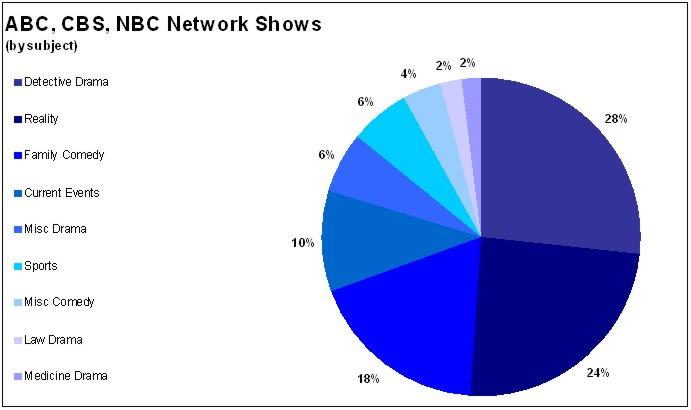
Basically, you've got reality shows and detective dramas. And for the squeamish there are family comedies, most of which feature the same white, middle-class, nuclear families that we've all come to know and snore to. This includes Yes Dear, Still Standing, Everybody Loves Raymond, etc. That's about 75% of it. I was expecting more legal dramas, but it may be a weekly aberration. If I'd had a harder time categorizing the shows, I would have been unexpectedly pleased, but about 90% of them fell into neat categories. There are a few "miscellaneous" shows in there, but it's probably only because I was unfamiliar with the show's premise and couldn't gather it from the TV Guide synopsis.
So there you go. The same crap on a different channel. Just get cable or satellite TV, a Tivo, and stay away from the "Big, Dumb Three" until they realize no one is watching. Of course by then we'll be watching interactive HDTV streamed over the Internet.
Monday, August 08, 2005
Making RSS Portable
OK, I admit, when I first saw this I was skeptical as to how it could be used, but the more I think about it, the more I like the idea. The site http://rss2pdf.com/ will take any RSS feed or OPML file and instantly turn it into a PDF.
One way I thought this would be helpful is for sending RSS feeds to people who don't "Get RSS." People like my boss. Anyone can open and print a PDF, eh? Plus you can archive feeds on your hard drive easily for offline reading.
It's in beta (what isn't?) but it seems to work well. I'd like to see some formatting options so you could create your own newspaper or magazine from your favorite RSS feeds. Also, It would be great to have a scheduler that would create PDFs and store them on your hard drive automatically for plane trips, train trips, etc.
I'm sure I will find some other cool uses for it, let's hope it stays around and stays free.
http://rss2pdf.com/
One way I thought this would be helpful is for sending RSS feeds to people who don't "Get RSS." People like my boss. Anyone can open and print a PDF, eh? Plus you can archive feeds on your hard drive easily for offline reading.
It's in beta (what isn't?) but it seems to work well. I'd like to see some formatting options so you could create your own newspaper or magazine from your favorite RSS feeds. Also, It would be great to have a scheduler that would create PDFs and store them on your hard drive automatically for plane trips, train trips, etc.
I'm sure I will find some other cool uses for it, let's hope it stays around and stays free.
http://rss2pdf.com/
Tuesday, July 12, 2005
Tour the World with a Thousand Friends
Google's willingness to let people play with their maps has brought an avalanche of cool and fun tools. One of the coolest I've seen lately is called "beenmapped.com." Beenmapped.com is basically a wiki for interesting destinations around the world using GoogleMaps.
Anyone who's played with the satellite view using GoogleMaps has likely encountered something they wanted to show someone else. Maybe you found a lake shaped like Alfred Hitchcock's profile or a possible UFO landing site in your local park. beenmapped.com gives you a place to post it, along with comments, and lets everyone else rate your location. Even if you don't use GoogleMaps, you can have a lot of fun looking at what other people have found.
From the site: "Ever since Google Maps went online with satellite pictures, all sorts of oddities are found every day. Secret installations, UFO candidates, and weird picture defects. But those were either soon forgotten or too scattered among website forums. Now those can all be found in one place: right here."
http://www.beenmapped.com
Anyone who's played with the satellite view using GoogleMaps has likely encountered something they wanted to show someone else. Maybe you found a lake shaped like Alfred Hitchcock's profile or a possible UFO landing site in your local park. beenmapped.com gives you a place to post it, along with comments, and lets everyone else rate your location. Even if you don't use GoogleMaps, you can have a lot of fun looking at what other people have found.
From the site: "Ever since Google Maps went online with satellite pictures, all sorts of oddities are found every day. Secret installations, UFO candidates, and weird picture defects. But those were either soon forgotten or too scattered among website forums. Now those can all be found in one place: right here."
http://www.beenmapped.com
An Encyclopedia of Pests
There are a lot of great resources out there to help you identify and eliminate spyware and adware from your computer. I just discovered Computer Associates' Spyware Information Center, which is very slick and very well-maintained. I especially like that they track emerging pests. Haven't seen that before.
Another great pest encyclopedia is on Kephyr.com, publisher of the Bazooka Adware and Spyware Scanner.
So if you see something running on your PC that you don't remember installing, check it against one of the above lists and find out how to deep-six it.
Another great pest encyclopedia is on Kephyr.com, publisher of the Bazooka Adware and Spyware Scanner.
So if you see something running on your PC that you don't remember installing, check it against one of the above lists and find out how to deep-six it.
Wednesday, July 06, 2005
Earth, Like You've Never Seen It
First of all, go to http://earth.google.com/ and download GoogleEarth immediately. It's free and it's the coolest thing you've seen. I could probably write a novel about how amazing it is, but it's better to see for yourself.
Google Earth is the natural extension of GoogleMaps in that it is one giant map, not just of the US, but of the whole world. In addition, it uses satellite images instead of graphic depictions. GoogleMaps has a satellite view as well, but GoogleEarth takes it further. You can tilt the view to see the land in 3D and in some cities include 3D renderings of buildings, which makes it possible to take a stroll down, say, Michigan Avenue in Chicago and feel like you're really walking between the buildings. And, like I said, it's the WHOLE WORLD. I assume there are "blackout areas" somewhere, but I haven't found any yet.
In addition to the incredible topography, Google includes a variety of "layers" that can be added to the maps like, street names, crime statistics, restaurants, railroads, political borders and much more.
There are hundreds of amazing touches that you really have to see to believe. Go get it http://earth.google.com/.

Google Earth is the natural extension of GoogleMaps in that it is one giant map, not just of the US, but of the whole world. In addition, it uses satellite images instead of graphic depictions. GoogleMaps has a satellite view as well, but GoogleEarth takes it further. You can tilt the view to see the land in 3D and in some cities include 3D renderings of buildings, which makes it possible to take a stroll down, say, Michigan Avenue in Chicago and feel like you're really walking between the buildings. And, like I said, it's the WHOLE WORLD. I assume there are "blackout areas" somewhere, but I haven't found any yet.
In addition to the incredible topography, Google includes a variety of "layers" that can be added to the maps like, street names, crime statistics, restaurants, railroads, political borders and much more.
There are hundreds of amazing touches that you really have to see to believe. Go get it http://earth.google.com/.

Thursday, June 23, 2005
New Yorker Magazine on DVD In Total
I'm not sure if any other magazines have done this, but I hope it becomes a trend. According to Boing Boing, you will soon be able to buy every issue of the New Yorker ever published on a set of DVDs for $100. Imagine if Time Magazine did this. Or National Geographic. Maybe they are doing it, I think I'll find out.
Anyway, it's especially cool that it's searchable and includes all the covers, cartoons, and everything. Check out the Boing Boing mention here.
Anyway, it's especially cool that it's searchable and includes all the covers, cartoons, and everything. Check out the Boing Boing mention here.
Wednesday, June 22, 2005
How Google Might Have Looked...
Apparently Google had intended to rip off Apple's Mac OS X at some point in their look and feel. They scrapped it, but someone saved it here:
http://hostingproject.info/Zilos/googlex/
Nothing earth-shaking, but pretty cool.
http://hostingproject.info/Zilos/googlex/
Nothing earth-shaking, but pretty cool.
Subscribe to:
Posts (Atom)