MSN has a pretty good Top Ten Dot.com flops worth reading. It really brings you back to the days of free money and bad business.
P.S. I do miss Webvan.
Monday, August 22, 2005


Sunday, August 21, 2005
Why TV Truly Sucks
So I was sitting around on a Sunday evening with nothing to do and I decided I'd make good on a promise I'd made to myself to prove why TV truly sucks. What would be my proof? I would categorize and all the TV shows on at primetime for the three major US networks (ABC, CBS, and NBC) and then total them to objectively display the networks' level of originality. I just included shows for the current week, figuring it would make a representative sample.
Below is a chart of what I found (click on it to see a larger version). I did my best to be objective and create logical categories. I may try to refine the process next time I'm bored and see if I can do a better job, but I think this gives a pretty good synopsis of the crap the network monkeys are flinging at our screens every week.

Basically, you've got reality shows and detective dramas. And for the squeamish there are family comedies, most of which feature the same white, middle-class, nuclear families that we've all come to know and snore to. This includes Yes Dear, Still Standing, Everybody Loves Raymond, etc. That's about 75% of it. I was expecting more legal dramas, but it may be a weekly aberration. If I'd had a harder time categorizing the shows, I would have been unexpectedly pleased, but about 90% of them fell into neat categories. There are a few "miscellaneous" shows in there, but it's probably only because I was unfamiliar with the show's premise and couldn't gather it from the TV Guide synopsis.
So there you go. The same crap on a different channel. Just get cable or satellite TV, a Tivo, and stay away from the "Big, Dumb Three" until they realize no one is watching. Of course by then we'll be watching interactive HDTV streamed over the Internet.
Below is a chart of what I found (click on it to see a larger version). I did my best to be objective and create logical categories. I may try to refine the process next time I'm bored and see if I can do a better job, but I think this gives a pretty good synopsis of the crap the network monkeys are flinging at our screens every week.
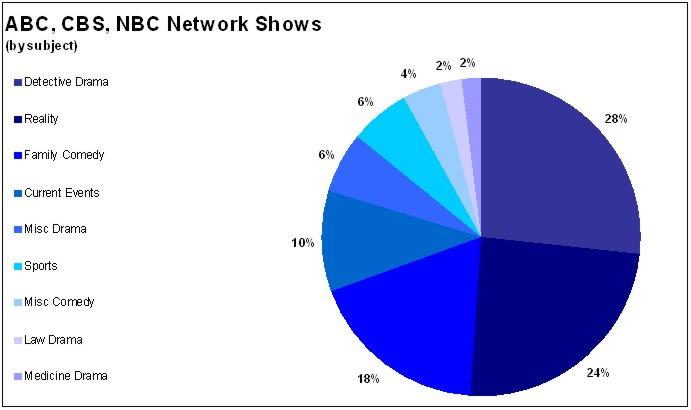
Basically, you've got reality shows and detective dramas. And for the squeamish there are family comedies, most of which feature the same white, middle-class, nuclear families that we've all come to know and snore to. This includes Yes Dear, Still Standing, Everybody Loves Raymond, etc. That's about 75% of it. I was expecting more legal dramas, but it may be a weekly aberration. If I'd had a harder time categorizing the shows, I would have been unexpectedly pleased, but about 90% of them fell into neat categories. There are a few "miscellaneous" shows in there, but it's probably only because I was unfamiliar with the show's premise and couldn't gather it from the TV Guide synopsis.
So there you go. The same crap on a different channel. Just get cable or satellite TV, a Tivo, and stay away from the "Big, Dumb Three" until they realize no one is watching. Of course by then we'll be watching interactive HDTV streamed over the Internet.
Monday, August 08, 2005
Making RSS Portable
OK, I admit, when I first saw this I was skeptical as to how it could be used, but the more I think about it, the more I like the idea. The site http://rss2pdf.com/ will take any RSS feed or OPML file and instantly turn it into a PDF.
One way I thought this would be helpful is for sending RSS feeds to people who don't "Get RSS." People like my boss. Anyone can open and print a PDF, eh? Plus you can archive feeds on your hard drive easily for offline reading.
It's in beta (what isn't?) but it seems to work well. I'd like to see some formatting options so you could create your own newspaper or magazine from your favorite RSS feeds. Also, It would be great to have a scheduler that would create PDFs and store them on your hard drive automatically for plane trips, train trips, etc.
I'm sure I will find some other cool uses for it, let's hope it stays around and stays free.
http://rss2pdf.com/
One way I thought this would be helpful is for sending RSS feeds to people who don't "Get RSS." People like my boss. Anyone can open and print a PDF, eh? Plus you can archive feeds on your hard drive easily for offline reading.
It's in beta (what isn't?) but it seems to work well. I'd like to see some formatting options so you could create your own newspaper or magazine from your favorite RSS feeds. Also, It would be great to have a scheduler that would create PDFs and store them on your hard drive automatically for plane trips, train trips, etc.
I'm sure I will find some other cool uses for it, let's hope it stays around and stays free.
http://rss2pdf.com/
Tuesday, July 12, 2005
Tour the World with a Thousand Friends
Google's willingness to let people play with their maps has brought an avalanche of cool and fun tools. One of the coolest I've seen lately is called "beenmapped.com." Beenmapped.com is basically a wiki for interesting destinations around the world using GoogleMaps.
Anyone who's played with the satellite view using GoogleMaps has likely encountered something they wanted to show someone else. Maybe you found a lake shaped like Alfred Hitchcock's profile or a possible UFO landing site in your local park. beenmapped.com gives you a place to post it, along with comments, and lets everyone else rate your location. Even if you don't use GoogleMaps, you can have a lot of fun looking at what other people have found.
From the site: "Ever since Google Maps went online with satellite pictures, all sorts of oddities are found every day. Secret installations, UFO candidates, and weird picture defects. But those were either soon forgotten or too scattered among website forums. Now those can all be found in one place: right here."
http://www.beenmapped.com
Anyone who's played with the satellite view using GoogleMaps has likely encountered something they wanted to show someone else. Maybe you found a lake shaped like Alfred Hitchcock's profile or a possible UFO landing site in your local park. beenmapped.com gives you a place to post it, along with comments, and lets everyone else rate your location. Even if you don't use GoogleMaps, you can have a lot of fun looking at what other people have found.
From the site: "Ever since Google Maps went online with satellite pictures, all sorts of oddities are found every day. Secret installations, UFO candidates, and weird picture defects. But those were either soon forgotten or too scattered among website forums. Now those can all be found in one place: right here."
http://www.beenmapped.com
An Encyclopedia of Pests
There are a lot of great resources out there to help you identify and eliminate spyware and adware from your computer. I just discovered Computer Associates' Spyware Information Center, which is very slick and very well-maintained. I especially like that they track emerging pests. Haven't seen that before.
Another great pest encyclopedia is on Kephyr.com, publisher of the Bazooka Adware and Spyware Scanner.
So if you see something running on your PC that you don't remember installing, check it against one of the above lists and find out how to deep-six it.
Another great pest encyclopedia is on Kephyr.com, publisher of the Bazooka Adware and Spyware Scanner.
So if you see something running on your PC that you don't remember installing, check it against one of the above lists and find out how to deep-six it.
Wednesday, July 06, 2005
Earth, Like You've Never Seen It
First of all, go to http://earth.google.com/ and download GoogleEarth immediately. It's free and it's the coolest thing you've seen. I could probably write a novel about how amazing it is, but it's better to see for yourself.
Google Earth is the natural extension of GoogleMaps in that it is one giant map, not just of the US, but of the whole world. In addition, it uses satellite images instead of graphic depictions. GoogleMaps has a satellite view as well, but GoogleEarth takes it further. You can tilt the view to see the land in 3D and in some cities include 3D renderings of buildings, which makes it possible to take a stroll down, say, Michigan Avenue in Chicago and feel like you're really walking between the buildings. And, like I said, it's the WHOLE WORLD. I assume there are "blackout areas" somewhere, but I haven't found any yet.
In addition to the incredible topography, Google includes a variety of "layers" that can be added to the maps like, street names, crime statistics, restaurants, railroads, political borders and much more.
There are hundreds of amazing touches that you really have to see to believe. Go get it http://earth.google.com/.

Google Earth is the natural extension of GoogleMaps in that it is one giant map, not just of the US, but of the whole world. In addition, it uses satellite images instead of graphic depictions. GoogleMaps has a satellite view as well, but GoogleEarth takes it further. You can tilt the view to see the land in 3D and in some cities include 3D renderings of buildings, which makes it possible to take a stroll down, say, Michigan Avenue in Chicago and feel like you're really walking between the buildings. And, like I said, it's the WHOLE WORLD. I assume there are "blackout areas" somewhere, but I haven't found any yet.
In addition to the incredible topography, Google includes a variety of "layers" that can be added to the maps like, street names, crime statistics, restaurants, railroads, political borders and much more.
There are hundreds of amazing touches that you really have to see to believe. Go get it http://earth.google.com/.

Thursday, June 23, 2005
New Yorker Magazine on DVD In Total
I'm not sure if any other magazines have done this, but I hope it becomes a trend. According to Boing Boing, you will soon be able to buy every issue of the New Yorker ever published on a set of DVDs for $100. Imagine if Time Magazine did this. Or National Geographic. Maybe they are doing it, I think I'll find out.
Anyway, it's especially cool that it's searchable and includes all the covers, cartoons, and everything. Check out the Boing Boing mention here.
Anyway, it's especially cool that it's searchable and includes all the covers, cartoons, and everything. Check out the Boing Boing mention here.
Wednesday, June 22, 2005
How Google Might Have Looked...
Apparently Google had intended to rip off Apple's Mac OS X at some point in their look and feel. They scrapped it, but someone saved it here:
http://hostingproject.info/Zilos/googlex/
Nothing earth-shaking, but pretty cool.
http://hostingproject.info/Zilos/googlex/
Nothing earth-shaking, but pretty cool.
Wednesday, June 15, 2005
Sending Big Files For Free
Quick note, I used to use WhaleMail.com a lot to send big files. Then they started charging for it. I paid for a while, but now I've discovered yousendit.com, which is free and lets you send up to 1GB. The upload is slow as you'd expect, but that's not yousendit.com's fault.
As per their site:
As per their site:
"If you have ever experienced www.YouSendIt.com or YouSendIt Enterprise Server, you already know the answer to this question: You find yourself effortlessly working with its easy to use interface, having complete confidence that your data will get to its destination without errors, risk, or confusion. Feeling comfortable with the knowledge that your sensitive information is completely safe and secure."
So there you go. Use it in good health.
Monday, June 13, 2005
Acronyms ASAP
Nice new acronym search tool called Acronyma.com. Clean interface, looks a bit like Teoma. Anyway, you get a search box and a button. You can also choose a language and choose Word or Acronym. If you choose Acronym and type in an acronym, you get a list of matches. ADA got me thirty results including Americans with Disabilities Act, American Dental Association, Average Daily Attendance, etc. It also bolds by importance, I assume by popularity somehow, but it doesn't say anywhere.
If you select Word in the search interface and type in a word it will return results that have that word in them. I typed in the word "random" and got 103 results (!) including Random Access Memory, Random Matrix Theory, and Random Amplified Polymorphic Dna (fancy!).
This looks like it will come in handy.
http://www.acronyma.com
If you select Word in the search interface and type in a word it will return results that have that word in them. I typed in the word "random" and got 103 results (!) including Random Access Memory, Random Matrix Theory, and Random Amplified Polymorphic Dna (fancy!).
This looks like it will come in handy.
http://www.acronyma.com
Friday, April 22, 2005
Make Your Own Church Signs
My brother sent me a link to an odd site that lets you create your own church signs. You know, you see them on the road, black block letters on a white board saying things like "God is watching, don't forget." Well now you can make your own. Like this:

Horribly childish. How can you not love this site? Check it out here: http://www.churchsigngenerator.com/
Horribly childish. How can you not love this site? Check it out here: http://www.churchsigngenerator.com/
Sunday, April 10, 2005
A New Addiction: Bloglines
Just what I needed—another RSS service to suck me in. The same day I was looking for a new RSS reader (only because I wanted to be able to export OPML files), I remembered I'd been meaning to check out Bloglines.com, which is a web-based RSS reader, among other things. I logged in to the skeletal Bloglines account I'd set up a while back and started futzing around with it. As it turns out, Bloglines is very cool.
Like most software-based RSS readers, it allows you to find and import RSS feed and then categorize them into various folders. However, keep in mind that since Bloglines is web-based, whatever you set up will be available from any machine with Internet access. Nice.
Bloglines has a fairly rudimentary directory of RSS feeds, including a search tool. They're not categorized, there's just an alphabetical list. This isn't really helpful, so you'll have to use the search, which usually finds a lot of good feeds. Type in a topic, like "gadgets" or "books" or whatever you're looking for and you'll be fine. Once you subscribe to a feed, you categorize it and set some basic options.
Bloglines also lets you create your own blog and use "clippings" from other feeds. For instance, you might read a news story of interest and then "clip" it and instantly create a new blog entry about it. This is also pretty cool.
I also got my wish of OPML exports, so now I can create my list of feeds in Bloglines and then export them to other RSS readers (specifically my PDA's RSS Reader, which I've been obsessing over lately).
Incidentally, all this is free. More on Bloglines as I uncover its many layers...
Like most software-based RSS readers, it allows you to find and import RSS feed and then categorize them into various folders. However, keep in mind that since Bloglines is web-based, whatever you set up will be available from any machine with Internet access. Nice.
Bloglines has a fairly rudimentary directory of RSS feeds, including a search tool. They're not categorized, there's just an alphabetical list. This isn't really helpful, so you'll have to use the search, which usually finds a lot of good feeds. Type in a topic, like "gadgets" or "books" or whatever you're looking for and you'll be fine. Once you subscribe to a feed, you categorize it and set some basic options.
Bloglines also lets you create your own blog and use "clippings" from other feeds. For instance, you might read a news story of interest and then "clip" it and instantly create a new blog entry about it. This is also pretty cool.
I also got my wish of OPML exports, so now I can create my list of feeds in Bloglines and then export them to other RSS readers (specifically my PDA's RSS Reader, which I've been obsessing over lately).
Incidentally, all this is free. More on Bloglines as I uncover its many layers...
Monday, March 14, 2005
The New Mapping Service to Beat
Google Maps, which is still technically in beta (is anything at Google not in beta?), is already a fantastic tool. In fact, I've stopped using MapQuest all together. The main reasons:
Google Maps allows you to scroll around in real time
Just click anywhere on the map and drag it around. It's like having a huge map of the US on the desk in front of you.
The maps just look better
High-resolution, nicely shaded maps with wide streets (when zoomed in). The text is easy to read well-placed. Markers have a nice drop shadow effect that looks really cool.
The maps are larger
By default, Google Maps' maps are huge, taking up most of the screen, this means better printing, and One field You don't have to tab between fields to enter an address, just type it into the search bar all at once. Google Maps figures it out.
More detail
You'll find more parks, lakes, college campuses, and all the other landmarks that help you find your way.
Less clutter
Unlike MapQuest, you won't find a ton of clutter around the page. Most of the clutter on the MapQuest page is advertising. The only advertising you'll see on Google is if you type in, say "pizza" and the name of a town. You'll see flags around the map indicating pizza places. Presumably these are pizza places that advertise with Google. This kind of advertising makes sense.
Google Maps lacks some of MapQuest's features like "Save to PDA, and Send to phone, but to be honest those features didn't work so well anyway and Google will likely add features like these eventually.
You can check out Google Maps at http://maps.google.com
Google Maps allows you to scroll around in real time
Just click anywhere on the map and drag it around. It's like having a huge map of the US on the desk in front of you.
The maps just look better
High-resolution, nicely shaded maps with wide streets (when zoomed in). The text is easy to read well-placed. Markers have a nice drop shadow effect that looks really cool.
The maps are larger
By default, Google Maps' maps are huge, taking up most of the screen, this means better printing, and One field You don't have to tab between fields to enter an address, just type it into the search bar all at once. Google Maps figures it out.
More detail
You'll find more parks, lakes, college campuses, and all the other landmarks that help you find your way.
Less clutter
Unlike MapQuest, you won't find a ton of clutter around the page. Most of the clutter on the MapQuest page is advertising. The only advertising you'll see on Google is if you type in, say "pizza" and the name of a town. You'll see flags around the map indicating pizza places. Presumably these are pizza places that advertise with Google. This kind of advertising makes sense.
Google Maps lacks some of MapQuest's features like "Save to PDA, and Send to phone, but to be honest those features didn't work so well anyway and Google will likely add features like these eventually.
You can check out Google Maps at http://maps.google.com
Sunday, March 13, 2005
On the Radio, Whoa Oh Oh Oh, On the Radio
We bought a new car and, unlike our old car, the new one has a working radio. That's when we realized that it had been so long since we'd actually listed to a radio in the car that we had no idea where to find any of the local stations. So we used the "seek" feature repeatedly until we had a few presets, most of which turned out to be lousy. Then we wondered where on the mighty Web we might find a complete list of radio stations in the Chicago area. Turns out we found a wonderful site that allows you to search for radio stations all around the world and on the Internet (streaming). The site is called Radio-Locator and can be found at http://www.radio-locator.com.
Radio-Locator's home page lets you search for stations by city or zip, state, or call letters. You can also use the Advanced Search to search by a myriad of other categories like format, owner, and more. You can search World radio by country or streaming Internet radio by format.
We ran a search on our zip code and it brought up 53 radio stations within listening range. Listed for each station are: Info, Call Sign, Frequency, Dist./Signal, City, School (if applicable), and Format. Clicking on "Info" brings up a page of technical details about the station like Web site, owner, address, coverage map, and many other things I can't imagine I'd ever need. The coverage map is actually pretty cool, showing the point of origin and color-coded rings emanating out from it. Slick.
Back to the main search list, clicking on the Call Sign brings up the stations Web page (in a new window, thank you very much). If the entry has a little lightning bolt to the left of it, you can click on it to launch their Internet stream. Also slick.
http://www.radio-locator.com
Radio-Locator's home page lets you search for stations by city or zip, state, or call letters. You can also use the Advanced Search to search by a myriad of other categories like format, owner, and more. You can search World radio by country or streaming Internet radio by format.
We ran a search on our zip code and it brought up 53 radio stations within listening range. Listed for each station are: Info, Call Sign, Frequency, Dist./Signal, City, School (if applicable), and Format. Clicking on "Info" brings up a page of technical details about the station like Web site, owner, address, coverage map, and many other things I can't imagine I'd ever need. The coverage map is actually pretty cool, showing the point of origin and color-coded rings emanating out from it. Slick.
Back to the main search list, clicking on the Call Sign brings up the stations Web page (in a new window, thank you very much). If the entry has a little lightning bolt to the left of it, you can click on it to launch their Internet stream. Also slick.
http://www.radio-locator.com
Monday, February 14, 2005
Sharing Your Music (and More) Legally
Apparently if you share music with less than 30 people at a time it is considered a private performance and is completely legal. That's the idea behind Grouper, a free peer-to-peer file sharing service which, rather opening your file collection to the general public, opens it to a group of people (less than 30 of 'em) you specify. Here's the other catch, which you'd better let your invitees know in advance. You cannot download each others' music, you can only stream it. This may come as a disappointment to your friends and family, but it's completely necessary if Grouper wants to obey the law. And, given the RIAA's relentless witch-hunts (more on that in another post), I'm sure they are playing it very much by the book.
Given these constraints, Grouper is still a neat tool. Keep in mind that while music can only be streamed, everything else (photos, documents, video, etc.) is fair game for downloading. Plus there is instant messaging (group and individual) built in. This could actually become a great business tool for teams in far-flung locations.
Just pick a folder(s) on your hard drive to share, send out a bunch of invitations and you're off and running. People accept your invitation, create their own account, share their files and you've got yourself a regular file-sharing commune.
You can immediately see who's online, search each others' files, chat with each other, and send out group messages. While the interface looks very cool, some elements of it, like the playlist, still need some fine-tuning. Also, the wide beveling of every element is fashionable, but wasteful. I'm sure skins will become available that allow designers to better use the real estate.
Ultimately, Grouper is a great free tool that will allow you and your friends to share music and files and have a little fun. It's available at http://www.grouper.com and costs nothing but some hard drive space.
Now if I could just get my brother Pete to join. I swear he has 4,000 albums....
Given these constraints, Grouper is still a neat tool. Keep in mind that while music can only be streamed, everything else (photos, documents, video, etc.) is fair game for downloading. Plus there is instant messaging (group and individual) built in. This could actually become a great business tool for teams in far-flung locations.
Just pick a folder(s) on your hard drive to share, send out a bunch of invitations and you're off and running. People accept your invitation, create their own account, share their files and you've got yourself a regular file-sharing commune.
You can immediately see who's online, search each others' files, chat with each other, and send out group messages. While the interface looks very cool, some elements of it, like the playlist, still need some fine-tuning. Also, the wide beveling of every element is fashionable, but wasteful. I'm sure skins will become available that allow designers to better use the real estate.
Ultimately, Grouper is a great free tool that will allow you and your friends to share music and files and have a little fun. It's available at http://www.grouper.com and costs nothing but some hard drive space.
Now if I could just get my brother Pete to join. I swear he has 4,000 albums....
Wednesday, February 09, 2005
A Cheesy Database
If you are lactose intolerant read no further. As an amateur cheese aficionado and lover of databases, I have a database of the cheeses I've tried, various qualities of them like flavor, aroma, hardness, wine pairings, etc. I decided to see if anyone else had done something similar, and, not surprisingly, someone has. In fact, it's probably the first place you'd look —cheese.com.
Cheese.com claims to have 652 cheeses in its database. You can use the basic search tool or browse by country, texture, milk, and more. Each entry includes a description, country, milk, recommended wine, and producer (although wine and producer appear to be "undefined" in the ones I tried).
The site itself is straightforward with unobtrusive ads on the right. However, while the database is fairly large, the lack of further information (serving suggestions, pairings, recipes, etc.), photos, and style make cheese.com a bit underwhelming.
A better bet is igourmet.com, which is an e-commerce site, but offers a great deal of information (and photos!) of cheese. Also, it offers serving suggestions, recipes, and related items. When the related items button is clicked it brings up similar cheeses and foods, which is pretty cool if you're putting out a cheese plate.
IFfanyone know of a better database, I'm all ears!
Cheese.com claims to have 652 cheeses in its database. You can use the basic search tool or browse by country, texture, milk, and more. Each entry includes a description, country, milk, recommended wine, and producer (although wine and producer appear to be "undefined" in the ones I tried).
The site itself is straightforward with unobtrusive ads on the right. However, while the database is fairly large, the lack of further information (serving suggestions, pairings, recipes, etc.), photos, and style make cheese.com a bit underwhelming.
A better bet is igourmet.com, which is an e-commerce site, but offers a great deal of information (and photos!) of cheese. Also, it offers serving suggestions, recipes, and related items. When the related items button is clicked it brings up similar cheeses and foods, which is pretty cool if you're putting out a cheese plate.
IFfanyone know of a better database, I'm all ears!
Tuesday, February 08, 2005
Lost in Translation
I think this is a fairly popular site, but maybe you haven't yet run across it. It's called http://www.engrish.com and it's all about the sometimes flailing attempts by Japanese marketers to translate copy into English.
It's a pretty large collection of examples and I strongly suggest you check out much of it. You'll be laughing loud and often.
It's a pretty large collection of examples and I strongly suggest you check out much of it. You'll be laughing loud and often.
Thursday, February 03, 2005
Put News Headlines On Your Site or Blog
The world is starting to love RSS. If I had my way, my toaster would serve up RSS feeds. Actually that's not a bad idea, hmm. Anyway, people love a site that serves up relevant news feeds. It's sticky and it's about as low maintenance as you can get. But how do you do it on the cheap? Or better, for free? It's easy thanks to a site called RSS Digest.
Step 1: Go find an RSS feed you want to put on your site. I use Newsisfree.com, but there are many out there, including: Syndic8, 2RSS, Feedster Feedfinder, Moreover.com, etc.
Step 2: Go to RSS Digest and paste the URL for the newsfeed (e.g., http://xml.newsisfree.com/feeds/83/11083.xml) into the first field.
Step 3: Click the "Create the Code" button and follow the onscreen prompts for setting up your feed. When you're done you'll have a snippet of code that you can paste into your blog or web page that will wow your site visitors and make you look really smart.
I use RSS Digest on this very blog in fact. You'll see the headlines on the lower right side of the screen there. It took me all of 15 minutes to add them. Which gives me plenty of time to go work on that toaster...
Step 1: Go find an RSS feed you want to put on your site. I use Newsisfree.com, but there are many out there, including: Syndic8, 2RSS, Feedster Feedfinder, Moreover.com, etc.
Step 2: Go to RSS Digest and paste the URL for the newsfeed (e.g., http://xml.newsisfree.com/feeds/83/11083.xml) into the first field.
Step 3: Click the "Create the Code" button and follow the onscreen prompts for setting up your feed. When you're done you'll have a snippet of code that you can paste into your blog or web page that will wow your site visitors and make you look really smart.
I use RSS Digest on this very blog in fact. You'll see the headlines on the lower right side of the screen there. It took me all of 15 minutes to add them. Which gives me plenty of time to go work on that toaster...
Wednesday, February 02, 2005
All the Music You Can Handle
There's no better site for music information than the All Music Guide. It contains a huge database of artists and just about everything you might want to know about them, including biographies, discographies, in depth reviews, music samples, chart information, similar artists, influences, and a whole bunch of unique features like "Explore by Mood." You have to register (for free) to get at all the good stuff.
The site is very usable, with a simple tabbed layout for each artist. I really like being able to see ratings for all an artist's albums at a glance along with similar artists an influences. Coupled with a service like Rhapsody or iTunes, you can ensure the albums you buy won't disappoint.
http://www.amg.com
The site is very usable, with a simple tabbed layout for each artist. I really like being able to see ratings for all an artist's albums at a glance along with similar artists an influences. Coupled with a service like Rhapsody or iTunes, you can ensure the albums you buy won't disappoint.
http://www.amg.com
Monday, January 31, 2005
Movie Title Screen Database
One of the many great things about the Web is that people can share their obsessive labors of love with the world. Apparently Steven Hill really digs movie screen titles, which are screen captures of the title screens that appear before every movie. While the interface isn't the greatest (basically click on a letter and scroll WAY down until you find the movie you're looking for), the collection is pretty darned impressive. I looked up a few of my favorite obscure movies and they were there (even "The Adventures of Buckaroo Banzai!)
Check out the collection at Steven Hill's Movie Title Screens Page.
Check out the collection at Steven Hill's Movie Title Screens Page.
Subscribe to:
Posts (Atom)